
Software
Simple CFD is a focused, affordable flow simulation tool for valves, nozzles, piping, and HVAC ductwork — steady-state and transient incompressible flow, without standing up a full simulation department. For a limited time, the perpetual license is available at a steep discount off its regular price.
Download for Windows or Linux See pricingWindows 1.2.3 · Linux 1.2.5 (deb / AppImage / Snap) — Linux builds now include a free tier, no licence key needed to start. See all downloads, or contact sales for a licence key.
See it in action
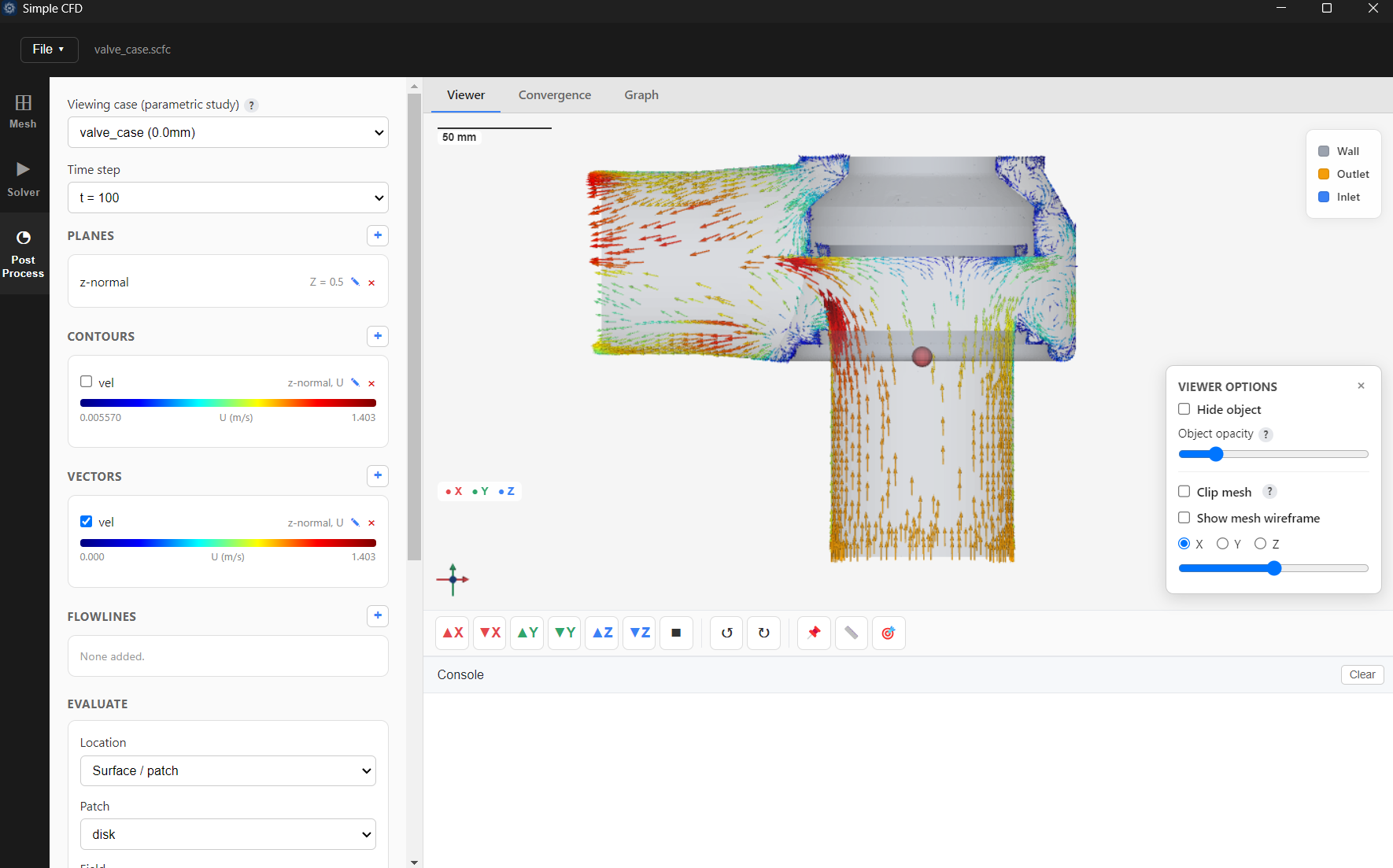
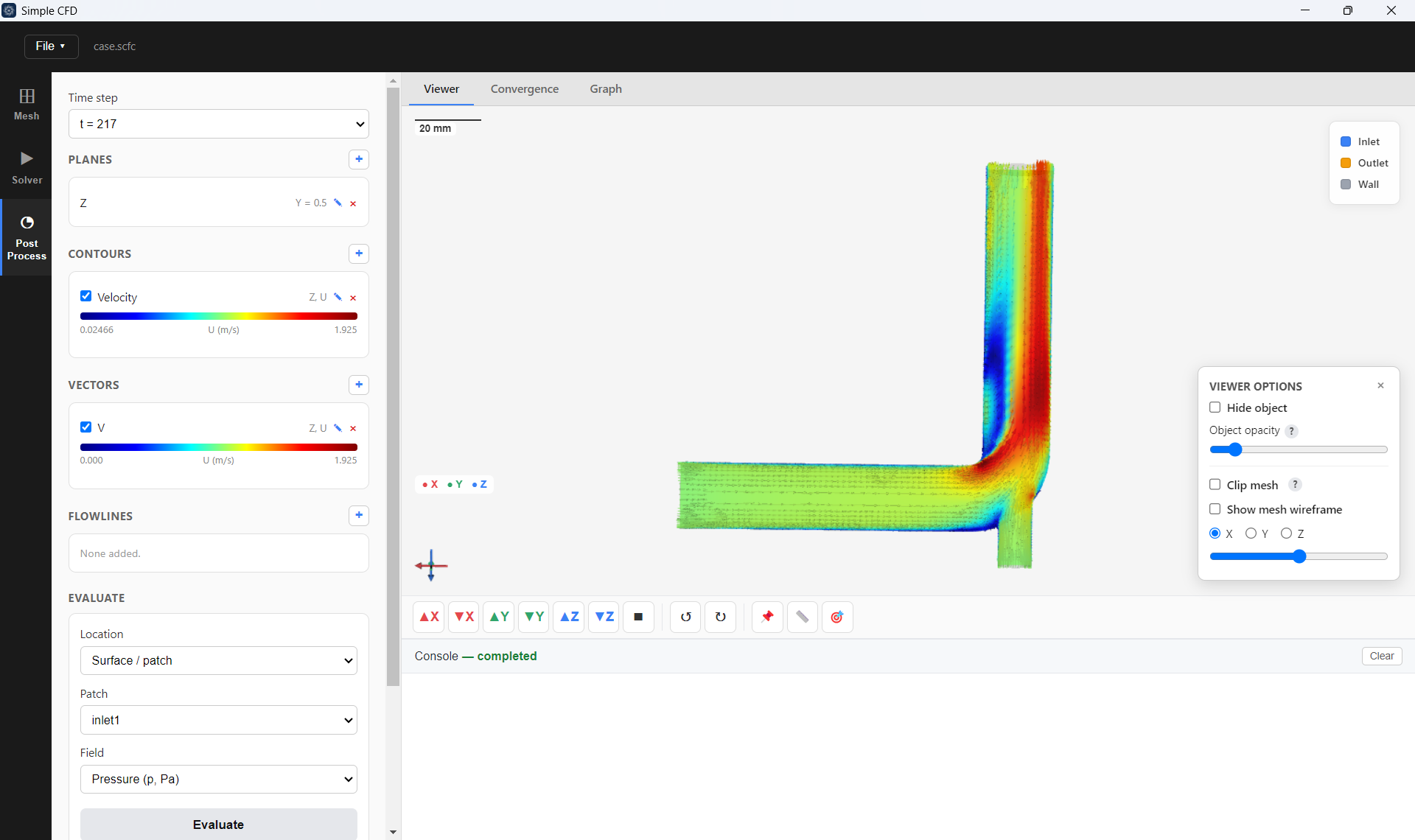
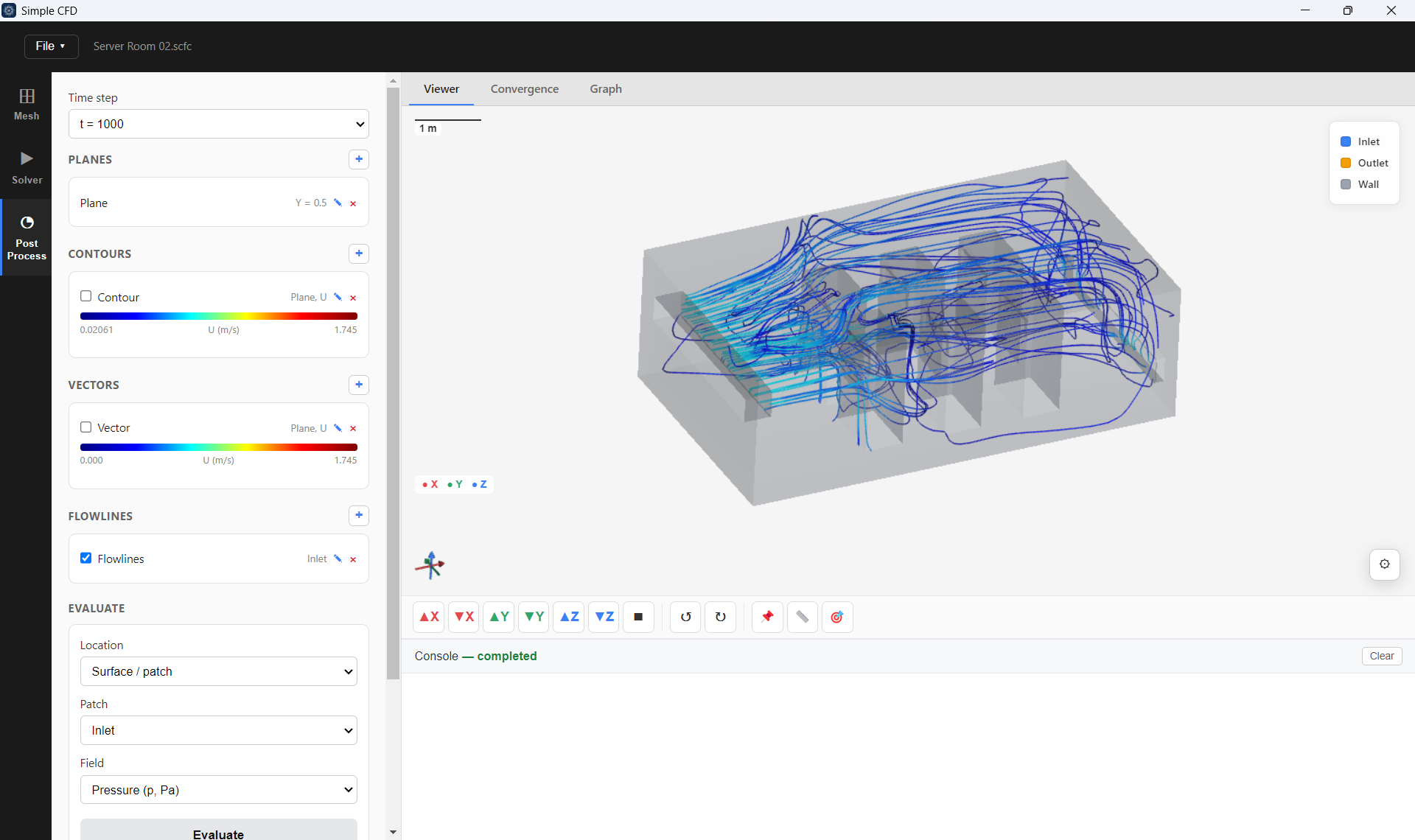
Upload your geometry, mark your inlet and outlet, and hit solve — no meshing expertise, no manual dictionary editing. A few clicks get you contour plots, velocity vectors, and force/mass-flow results you can trust, on any machine that can run Windows.
What it does
Every flow problem eventually comes down to one of two questions: what does this system look like once it settles down, or how does it behave while it's changing? Simple CFD answers both, for incompressible flow — liquids, and gases at low speed, which covers the vast majority of valve, nozzle, piping, and duct work.
For systems that settle into a stable operating condition — pressure drop across a valve at a fixed opening, flow distribution through a piping network, steady airflow through HVAC ductwork.
For behavior that develops over time — how a flow field builds up and settles after a change in operating condition, or how pressure and velocity evolve through a duct or manifold. See the flow step by step, not just the final value.
Where it's used
Pressure drop across control and shut-off valves at various openings, flow coefficient (Cv/Kv) validation, and force on the disk or plug at each position.
Discharge behaviour through nozzles, orifice plates, and restrictions — pressure loss, jet development, and flow-coefficient checks against measured data.
Flow distribution across branches and headers, pressure loss through fittings, elbows, and reducers, and sizing verification before a line goes into service.
Duct airflow distribution across branches, diffuser and grille performance, and pressure loss through bends, dampers, and transitions at a given operating condition.
Download
Windows and Linux builds are both available. Linux runs immediately, unlicensed, with a free tier — up to 100,000 mesh cells on 1 CPU core, no licence key required. Windows needs a licence key to run; install it free, then contact sales for the key.
All formats, checksums, and install instructions are on the full downloads page. Already have Simple CFD and need a licence key? Contact sales — we'll send it by email, and you paste it into the Activate License screen.
Limited time pricing
Choose a yearly subscription that always includes the latest updates, or a one-time perpetual purchase. The pricing below is a limited time offer and won't stay at this level indefinitely, so it's worth locking in while it's available. Every license is bound to one seat on one machine, and runs one instance at a time.
Perpetual license
one-time payment
Save ₹75,000 — nearly half off the regular price
One license = one seat, one machine, one running instance
Get the perpetual licenseAnnual subscription
per year
Continuous updates for as long as you subscribe
One license = one seat, one machine, one running instance
Get the subscriptionNeed licenses for more than one machine or a whole team? Contact sales for bulk purchase pricing.
On Linux, just download and install — it runs immediately, unlicensed, on a free tier (up to 100,000 mesh cells, 1 CPU core). No key needed to try it.
On Windows, or to remove the Linux free-tier limits on either platform, you need a licence key: email us using any of the buttons on this page, we'll confirm your order and payment details, and your key arrives by email. Paste it into the Activate License screen the first time you open the app.
Each license — subscription or perpetual — activates on a single machine, and allows one running instance of Simple CFD at a time on that machine. Opening a second copy while the first is running is not permitted by the license. If you need to move to a different computer, deactivate the license on the old machine first (or contact support and we'll reset it for you), then activate it on the new one. Need more than one seat? Contact sales for bulk pricing.
If you want the lowest cost over time and don't mind updates stopping after the included year, the perpetual license is the better deal — especially at this limited time price. If you'd rather always be on the latest version and prefer a lower amount paid upfront, the annual subscription keeps updates coming for as long as you renew.
Windows 10 or 11, 64-bit
or Ubuntu 22.04 / 24.04 Linux, 64-bit
Full download page, with per-platform install instructions →
Have a question before you get started? Talk to our team — we're happy to walk through what Simple CFD covers for your specific application.
Choose the right tool
Both products deliver practical, engineering-grade CFD without the cost and complexity of typical commercial software. Simple CFD is focused and fast for incompressible flow; DynamiX CFD is the broader platform, with additional flow physics, applications, and capabilities being added continuously.
| What's covered | SimpleCFD | DynamiX CFD | Typical commercial CFD |
|---|---|---|---|
| Purchase cost | Low-cost one-time license; annual subscription available. | Low-cost one-time or yearly subscription; cloud compute availability. | High upfront license, typically renewed annually. |
| Ongoing / renewal cost | Renewal only for the subscription plan. | Optional renewal; subscription plan keeps updates current. | High recurring annual maintenance and renewal fees. |
| Applications covered | Valves, nozzles, orifices, piping networks, HVAC ductwork, and related incompressible flow studies. | Aerospace, automotive, general industrial flow, HVAC, building airflow, valves, and flow-control applications, with new areas added continuously. | Broad multi-industry coverage, often with added complexity and cost. |
| Flow conditions | Steady-state and transient incompressible flow. | Full range including incompressible, multiphase, and mixing flow. | Full range including compressible, multiphase, and reacting flow. |
| Turbulence modeling | Industry-standard k-epsilon model, validated against real test cases. | Large library of turbulence models for specialized use cases. | Large library of models for broad specialist use cases. |
| Meshing | Automated hex-dominant / polyhedral mesh generation for your geometry. | Automated polyhedral mesh with adaptive refinement tuned per case. | Mesh strategy typically requires manual setup and specialist tuning. |
| Visualization & studies | Full 3D visualization, contour plots, vector plots, flow paths, and automatic comparison charts; parametric studies included. | Full 3D visualization, contour plots, vector plots, flow paths, automatic comparison charts, and parametric studies. | Comprehensive visualization, often with separate or additional paid modules. |
| Setup & feature rollout | Minutes to begin; minimal workflow and no CFD specialist required. | Guided, low-effort workflows and active development with new capabilities released regularly. | Days to weeks of training; new features follow the vendor's release cycle. |
Want the full comparison?
Download the SimpleCFD and DynamiX CFD comparison brief for a detailed feature-by-feature view.
Coming soon
We're building a complete CFD platform that goes beyond steady and transient incompressible flow — currently in active development. A live demo of DynamiX CFD is available now, ahead of full release.